Infrastructure
Structured Cabling in Los Angeles
Cat6, Cat6A and fiber for offices, multifamily and estates — certified and warranty-registered.
Open page
When an office network fails, the fault sits in one of three layers. Upstream of the demarcation point it belongs to your carrier and no contractor may lawfully touch it. Between the demarc and the wall jack — cable, terminations, patch panels, switches and PoE — it is physical, and that is licensed low-voltage work. Above that, in DHCP, DNS, VLANs, firewall rules and cloud accounts, it is logical, and that is your IT provider. Ten minutes of triage tells you which one, and stops you paying the wrong trade to look at the wrong layer.
Free on-site assessment across Los Angeles County. C-10 CSLB #1043428 · BSIS ACO 7755.
Call (805) 517-4668 Email usAlmost every wasted service call starts the same way: someone reports “the internet is down” and a vendor is dispatched before anyone has established which internet is down. The table below is the fastest way to narrow it. Run it from a wired desk if you can — Wi-Fi adds a variable you do not need while diagnosing.
| What you are seeing | Most likely layer | Who fixes it | Check this first |
|---|---|---|---|
| Whole site offline, but devices still see each other and printers still respond | Carrier circuit or firewall | Your ISP, then IT | Lights on the carrier's box at the demarcation point; the ISP's outage page |
| One floor, one suite or one run of desks dead; everything else fine | Physical — switch, uplink or a cable path | Low-voltage contractor | Is the switch serving that area powered, and is its uplink port lit? |
| One desk dead, and moving to the neighbouring jack fixes it | Physical — that run or that jack | Low-voltage contractor | Swap in a known-good patch cord before anything else |
| Link works but shows 100 Mbps where it used to show 1 Gbps | Physical — a damaged or mis-terminated pair | Low-voltage contractor | Known-good patch cord; if it comes back to 1 Gbps the cord was the fault |
| Cameras or access points reboot in a loop, or drop when more are added | PoE budget or cable heat | Low-voltage contractor | Total PoE draw against the switch's budget, not its per-port rating |
| Wired is fine, Wi-Fi is not — or Wi-Fi is fine in some rooms only | Wireless design or AP uplink | Low-voltage contractor, with IT | Does the problem follow the room or follow the device? |
| Everything works except one application or one cloud service | Logical — DNS, firewall rule, licence, provider outage | IT or MSP | Does it fail on a phone on mobile data too? If yes, it is not your network |
| New devices get no address; existing ones keep working until they are rebooted | Logical — DHCP scope exhausted or server down | IT or MSP | Whether the affected device has a 169.254 address |
Two rows in that table resolve without anyone being dispatched at all, and two more resolve with a spare patch cord. That is the point of running it.
“The network” is three separately owned things stacked on top of each other, and the arguments happen at the seams.
Federal rules define where your circuit stops being the carrier's problem. Under 47 CFR § 68.105, the minimum point of entry is the closest practicable point to where the wiring crosses the property line or enters a multiunit building, and while a subscriber or premises owner may install, remove, reconfigure and rearrange wiring on their own side of the demarcation point, they may not access carrier wiring and facilities on the carrier's side. In multiunit premises with multiple demarcation points, a customer's demarcation point may be no further inside their premises than twelve inches from where the wiring enters, or as close to that as practicable.
Practically: if the fault is upstream of the demarc, no contractor can lawfully fix it and no amount of internal work will help. Find that box, look at it, and call the carrier before you call anyone else.
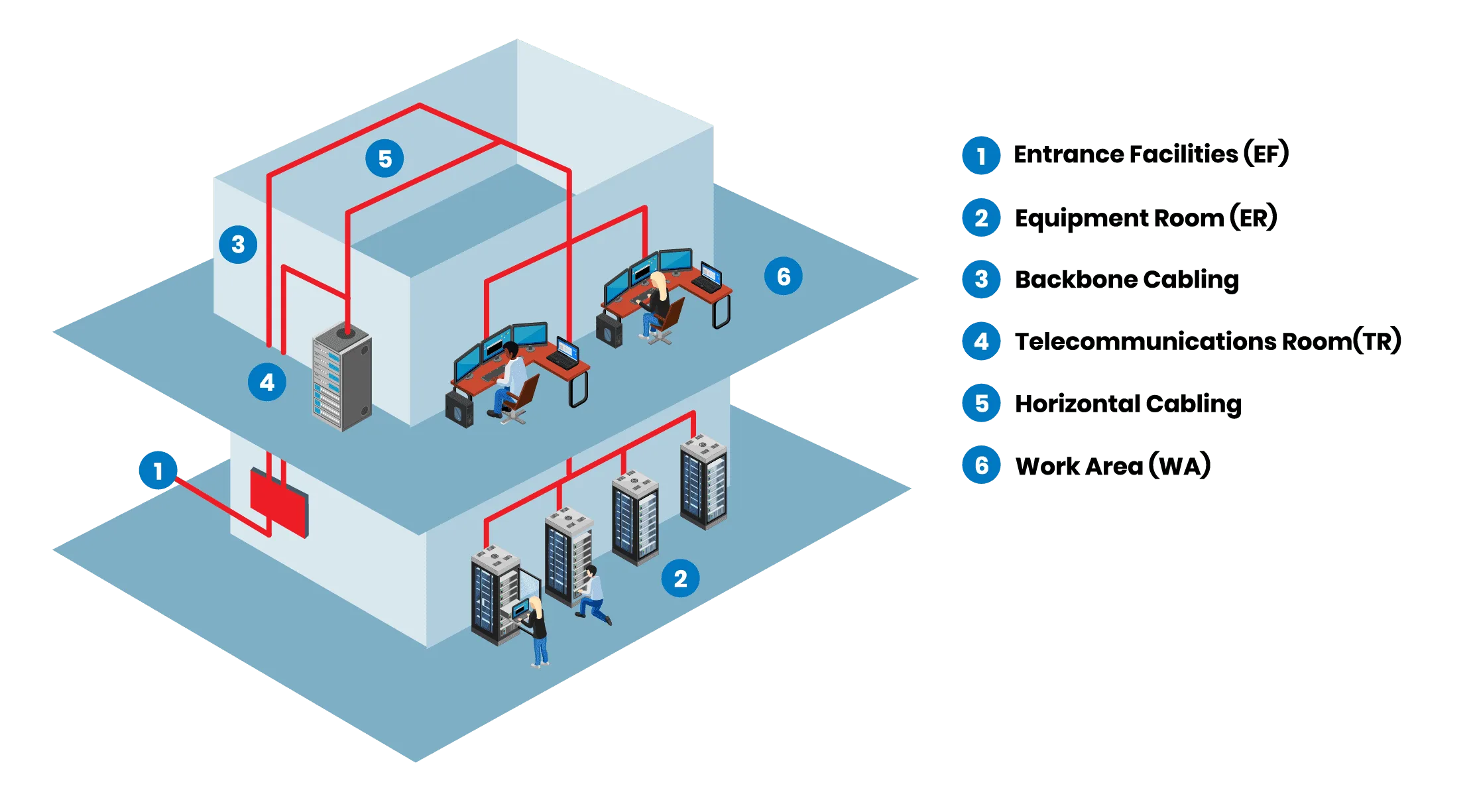
Cable, terminations, patch panels, jacks, pathways, racks, grounding, the switches that power the edge and the PoE budget behind them. This is licensed low-voltage contracting work and it is where most “the network is down” calls actually land, because it is the only layer that degrades physically — chairs, ceilings, remodels, rodents, heat and time all act on it.
Addressing, DHCP, DNS, VLANs, routing, firewall policy, VPN, identity, mailboxes, SaaS. Your IT provider or MSP owns this. A cabling contractor who starts editing firewall rules is out of their lane, and an MSP who insists a dead run is a “configuration issue” is out of theirs.
| Low-voltage contractor | IT provider or MSP |
|---|---|
| Horizontal cable, terminations, jacks and patch panels | DHCP, DNS, IP addressing and VLAN design |
| Backbone and fiber between MDF and IDFs | Firewall policy, VPN and remote access |
| Racks, cable management, grounding and bonding | Servers, endpoints, identity and email |
| Pathways, conduit, sleeves, fire-stopping and cable listing | Backup, patching and security tooling |
| PoE budget, switch power and UPS sizing at the edge | Switch configuration, port profiles and monitoring |
| Wireless survey, AP placement, mounting and cabling | SSIDs, authentication, RADIUS and captive portal |
| Certification testing and warranty registration | Change control and documentation of the logical build |
The grey zone is switches and access points, because both trades touch them. The practical split that avoids finger-pointing: the low-voltage contractor is responsible for the device being present, powered, mounted, cabled and within its power budget; the IT provider is responsible for what it is configured to do. Write that sentence into the scope of work and most cross-vendor disputes stop before they start.
ANSI/TIA-568 has long limited a horizontal twisted-pair channel to 100 m — a 90 m permanent link plus up to 10 m of combined patch and equipment cords. Exceed it and the link does not politely warn you; it becomes intermittent, or it negotiates down, or it works in winter and fails in a heatwave.
The detail that catches people out is the thin patch cords now common in dense racks. ANSI/TIA-568.2-D recognises 28 AWG cords but applies an attenuation de-rating factor of 1.95 for them, which pulls a 100 m channel back to roughly 96 m — 90 m of permanent link plus about 6 m of cords, and recommends keeping total 28 AWG cord length in a channel under 15 m. If a run was already close to the limit, switching to slim cords is enough to break it.
Gigabit Ethernet uses all four pairs. 100 Mbps uses two. So when one pair is damaged, open or terminated on the wrong pairing, the port does not fail — it downshifts and keeps working. Nobody files a fault; people just say the network feels slow. Check link speed on the complaining desks before you believe anything else, and swap a patch cord before you open a ceiling.
Cameras, access points, door controllers and phones all draw from the same pool, and the failure mode — devices rebooting in a loop, or the last device added killing an earlier one — looks like a device fault rather than a power fault.
| Standard | Type | Delivered by the switch port | Available at the device | Pairs used |
|---|---|---|---|---|
| IEEE 802.3af | Type 1 | 15.4 W | 12.95 W | 2 |
| IEEE 802.3at | Type 2 | 30 W | 25.5 W | 2 |
| IEEE 802.3bt | Type 3 | 60 W | 51 W | 4 |
| IEEE 802.3bt | Type 4 | 90 W | 71.3 W | 4 |
A 24-port switch advertising 802.3at does not deliver 30 W on 24 ports at once. Add up the real draw, compare it to the switch's total budget, and leave headroom for the next camera. The same arithmetic governs a camera rollout — see the commercial CCTV guide for how PoE budget shapes a camera bid.
Powered cable warms up, and cables in the middle of a bundle run hottest. TIA TSB-184-A recommends limiting temperature rise to no more than 15 °C at an ambient of 45 °C, given the typical 60 °C rating of category cable, and recommends leaving cables unbundled where possible — or, where it is not, keeping bundles small and limiting them to 24 cables to control the rise. This is why a system that passed on day one starts dropping devices after the second and third phases are added to the same tray.
Usually not, and it is worth resisting anyone who says yes before testing. What the existing cable can carry is a published question with published answers.
| You have | 1 Gbps | 2.5 Gbps | 5 Gbps | 10 Gbps |
|---|---|---|---|---|
| Category 5e | 100 m | 100 m | Not specified | No |
| Category 6 | 100 m | 100 m | 100 m | 37 m, and 37–55 m depending on alien crosstalk |
| Category 6A | 100 m | 100 m | 100 m | 100 m |
IEEE 802.3bz added 2.5GBASE-T and 5GBASE-T precisely so that existing plant would not have to be replaced to get past 1 Gbps — 2.5 Gbps over Cat5e at 100 m, 5 Gbps over Cat6 at 100 m. For access-point uplinks, which is where most offices first hit the 1 Gbps ceiling, that is generally the whole answer.
Ten-gigabit is the real dividing line. TIA TSB-155-A states that 10GBASE-T should operate over Category 6 channels up to 37 m, and between 37 and 55 m depending on the alien-crosstalk environment, with channels over 55 m potentially requiring mitigation. Alien crosstalk is coupling between adjacent cables, which is exactly what a tightly bundled riser produces — so the same Cat6 that tests fine as a single run can fail in a full tray. Category 6A is specified for 10GBASE-T across the full 100 m channel. If 10-gig to the desk is on the roadmap, plan Cat6A; if it is not, spend the money on wireless coverage instead.
When Wi-Fi is bad in one corner of an office, the answer is rarely a better router. Coverage is a function of where access points are, how many there are, what they are cabled with, and what spectrum they can legally use.
The 6 GHz band (5,925–7,125 MHz) opened by the FCC is what makes Wi-Fi 6E and Wi-Fi 7 worth the upgrade — it is enough contiguous spectrum for wide channels, up to 320 MHz, without the congestion that makes 2.4 GHz useless in a dense building. But there are two power classes, and the difference matters for real installations: low-power indoor devices operate without coordination, while standard-power devices — higher power, and the only route to outdoor 6 GHz use — must operate under an Automated Frequency Coordination system that protects incumbent fixed microwave links. If a proposal promises 6 GHz across a yard or between buildings, ask which power class and whether AFC is in play.
And the uplink is the constraint people forget. A modern AP can serve more than a gigabit; if it is fed by a single 1 Gbps port, that port is the ceiling no matter what the radios can do. This is the most common place where multi-gig over existing Cat5e or Cat6 pays for itself immediately.
Every installer says they tested it. The word covers three different levels of evidence, and the gap between them is where cheap bids live.
| Tier | What it proves | What it does not |
|---|---|---|
| Verification — wiremap and continuity | The right pins connect to the right pins | Nothing about bandwidth, loss, crosstalk or margin |
| Qualification | The link can carry a particular application today, e.g. 1 Gbps or PoE | Whether it meets a standard, or will carry the next application |
| Certification | The permanent link or channel meets the TIA or ISO/IEC performance limits for its category, with a stored, standards-referenced report per link | — |
Only certification produces a defensible record, and it needs a proper field certifier rather than a handheld continuity checker. It is also what manufacturers require: vendor-backed structured cabling warranties — commonly 25 years — are issued against submitted certification results from a qualified installer, typically within a set window after completion. No report, no warranty, whatever the brochure said.
Ask for the reports. If a previous installer cannot produce per-link certification results, you do not know what your building can carry, and every future upgrade starts with a survey you have already paid for once. Innov8av certifies what it installs and hands over the results — see structured cabling in Los Angeles for what a certified install includes and cabling costs for how it is priced.
Innov8av responds the same day where the schedule allows, and the on-site assessment is free. For planning, structured cabling projects run $3,000–$30,000+ and access control $3,000–$40,000+; a diagnostic visit on an existing network is scoped after we see the site, not quoted blind.
Innov8av holds a California C-10 Electrical contractor licence, CSLB #1043428. The C-10 classification carries no voltage ceiling and encompasses the low-voltage work the C-7 defines, so the same licence covers data cabling, camera systems and the electrical work around them. Innov8av also holds a BSIS Alarm Company Operator licence, ACO 7755, the separate licence California requires for alarm work. Both numbers are checkable on the state's public lookups, and any bidder should be able to give you theirs without hesitating.
Working across Los Angeles since 2016, insured and bonded, bilingual in English and Spanish, rated 5.0/5 across 22 verified Reviews.io reviews with an A+ BBB rating. We do structured cabling, business Wi-Fi, commercial cameras and access control as one coordinated low-voltage package, which is the point when a build-out needs all four and you would rather not referee three subcontractors.
Tell us whether the fault is site-wide or local, and we will tell you honestly whether you need us or your IT provider. Free on-site assessment across Los Angeles County.


Find the layer first. If nothing on the site reaches the internet but devices still talk to each other, the fault is usually upstream at the carrier or the firewall. If one area, one floor or one run of desks is dead while everything else works, it is almost always physical — cable, termination, patch panel or switch port — and that is low-voltage work. If a single application fails while browsing works, it is IT. Calling the wrong trade costs a wasted visit, so spend ten minutes on the triage table above before you dial.
Innov8av responds the same day where the schedule allows, and books a free on-site assessment for anything that needs eyes on the rack. Before that visit, two things shorten it a great deal: tell us whether the failure is site-wide or localised to one area, and have someone available who can open the IDF or telecom closet. If you have as-built cabling records or certification reports, have them ready — on an unlabelled site, tracing runs is often the longest part of the job.
That is the single most common physical-layer fault and it almost never gets reported as a fault at all, because the link still works. Gigabit Ethernet needs all four pairs; 100 Mbps needs only two. When one pair is damaged, mis-terminated or open, the port negotiates down to 100 Mbps instead of failing, so users report it as slowness rather than an outage. A chair rolled over a cable, a door closed on it, or a jack terminated on the wrong pairing will do it. Swapping in a known-good patch cord tells you within a minute whether the fault is the cord or the wall run.
Often the existing cable is fine. Under IEEE 802.3bz, 2.5GBASE-T runs over Cat5e at the full 100 m and 5GBASE-T runs over Cat6 at the full 100 m, which is usually enough to stop a Wi-Fi 6E or Wi-Fi 7 access point being throttled by a 1 Gbps uplink. Ten-gigabit is where the cable decides: TIA TSB-155-A puts 10GBASE-T over Category 6 at up to 37 m, and between 37 and 55 m depending on the alien-crosstalk environment, with lengths over 55 m potentially requiring mitigation. Category 6A carries 10GBASE-T for the full 100 m channel. So the honest answer is: multi-gig, keep your cable; 10-gig to the desk, plan on Cat6A.
As a planning range, structured cabling projects run $3,000 to $30,000 and up, and access control runs $3,000 to $40,000 and up. What moves a quote inside those ranges is drop count, run length and pathway difficulty, the cable category and listing, how much of the work is after hours, and whether the result is certified and warranty-registered or merely tested for continuity. Innov8av quotes line by line after a free on-site assessment and does not issue a final price sight-unseen.
It has to be, and it is worth checking. Innov8av holds a California C-10 Electrical contractor licence, CSLB #1043428. The C-10 classification carries no voltage ceiling and encompasses the low-voltage work the C-7 defines, so a C-10 contractor may lawfully install data cabling, camera and other low-voltage systems. Innov8av also holds a BSIS Alarm Company Operator licence, ACO 7755, which is the separate licence California requires for alarm work. Both numbers are verifiable on the state's public licence lookups — ask any bidder for theirs and check it.
Find the layer first. If nothing on the site reaches the internet but devices still talk to each other, the fault is usually upstream at the carrier or the firewall. If one area, one floor or one run of desks is dead while everything else works, it is almost always physical — cable, termination, patch panel or switch port — and that is low-voltage work. If a single application fails while browsing works, it is IT. Calling the wrong trade costs a wasted visit, so spend ten minutes on the triage table above before you dial.
Innov8av responds the same day where the schedule allows, and books a free on-site assessment for anything that needs eyes on the rack. Before that visit, two things shorten it a great deal: tell us whether the failure is site-wide or localised to one area, and have someone available who can open the IDF or telecom closet. If you have as-built cabling records or certification reports, have them ready — on an unlabelled site, tracing runs is often the longest part of the job.
That is the single most common physical-layer fault and it almost never gets reported as a fault at all, because the link still works. Gigabit Ethernet needs all four pairs; 100 Mbps needs only two. When one pair is damaged, mis-terminated or open, the port negotiates down to 100 Mbps instead of failing, so users report it as slowness rather than an outage. A chair rolled over a cable, a door closed on it, or a jack terminated on the wrong pairing will do it. Swapping in a known-good patch cord tells you within a minute whether the fault is the cord or the wall run.
Often the existing cable is fine. Under IEEE 802.3bz, 2.5GBASE-T runs over Cat5e at the full 100 m and 5GBASE-T runs over Cat6 at the full 100 m, which is usually enough to stop a Wi-Fi 6E or Wi-Fi 7 access point being throttled by a 1 Gbps uplink. Ten-gigabit is where the cable decides: TIA TSB-155-A puts 10GBASE-T over Category 6 at up to 37 m, and between 37 and 55 m depending on the alien-crosstalk environment, with lengths over 55 m potentially requiring mitigation. Category 6A carries 10GBASE-T for the full 100 m channel. So the honest answer is: multi-gig, keep your cable; 10-gig to the desk, plan on Cat6A.
As a planning range, structured cabling projects run $3,000 to $30,000 and up, and access control runs $3,000 to $40,000 and up. What moves a quote inside those ranges is drop count, run length and pathway difficulty, the cable category and listing, how much of the work is after hours, and whether the result is certified and warranty-registered or merely tested for continuity. Innov8av quotes line by line after a free on-site assessment and does not issue a final price sight-unseen.
It has to be, and it is worth checking. Innov8av holds a California C-10 Electrical contractor licence, CSLB #1043428. The C-10 classification carries no voltage ceiling and encompasses the low-voltage work the C-7 defines, so a C-10 contractor may lawfully install data cabling, camera and other low-voltage systems. Innov8av also holds a BSIS Alarm Company Operator licence, ACO 7755, which is the separate licence California requires for alarm work. Both numbers are verifiable on the state's public licence lookups — ask any bidder for theirs and check it.
Related: Structured Cabling Cost · Low-Voltage Contractor in Los Angeles · Access Control in Los Angeles · Commercial CCTV Installation
Related guide: Moving Offices in Los Angeles: the Cabling, Network, Camera and Access-Control Checklist